Page 1 of 1
Problems with Captcha
Posted: Fri Jun 22, 2012 3:10 pm
by Oink
Ever since updating to Firefox 13.x, I've been having issues with Captchas. ...and I don't mean I have to allow specific elements or even disable Noscript globally... I mean I have to disable the add-on entirely and restart firefox in order to make it work.
One example is a captcha thrown by linkedin:
https://www.linkedin.com/uas/login-submit
Re: Problems with Captcha
Posted: Mon Jun 25, 2012 11:26 am
by Thrawn
I'm not on LinkedIn, so unfortunately I can't test this. What I can suggest is a) Is there anything NoScript-related in Tools-Error Console? and b) Have you tried a new
profile?
Re: Problems with Captcha
Posted: Mon Jun 25, 2012 2:54 pm
by Oink
no errors in the console directly related to noscript... but a new profile DOES make it work. Do you have any hints on how to reset the profile data without blowing away the entire profile.
(Incidentally, the recaptcha for THIS page doesn't display either ... without a test profile or total disable of noscript.)
Re: Problems with Captcha
Posted: Mon Jun 25, 2012 3:06 pm
by therube
I clicked the "I'm a human" button & it replied, "no you are not!"

.
> I'm not on LinkedIn
You don't need one.
Just enter bogus un/pw (at the top of the page) & you're taken to the captcha page.
Disable NoScript.
Does the captcha then display/work?
If not, then it is not a NoScript issue

.
Otherwise, some other blocking that you may have going on.
Somewhere, blocking google.com, HOSTS file?
Re: Problems with Captcha
Posted: Mon Jun 25, 2012 4:38 pm
by Oink
Oink wrote:Disable NoScript.
Does the captcha then display/work?
If not, then it is not a NoScript issue .
as per the original post, disabling noscript makes the captcha display.
Re: Problems with Captcha
Posted: Tue Jun 26, 2012 2:52 am
by Thrawn
Oink wrote:no errors in the console directly related to noscript... but a new profile DOES make it work. Do you have any hints on how to reset the profile data without blowing away the entire profile.
(Incidentally, the recaptcha for THIS page doesn't display either ... without a test profile or total disable of noscript.)
Just to clarify: this is a clean profile with just NoScript installed (no addons will be installed by default)? If so, and it works, then it sounds like your old profile is corrupt. I wouldn't try to copy any of it over to the new one, lest you corrupt the new one, but if you want to, it's just a matter of copying files from one directory to the other.
Re: Problems with Captcha
Posted: Sun Jul 01, 2012 3:47 pm
by 7leagues
I have been having the same problem at
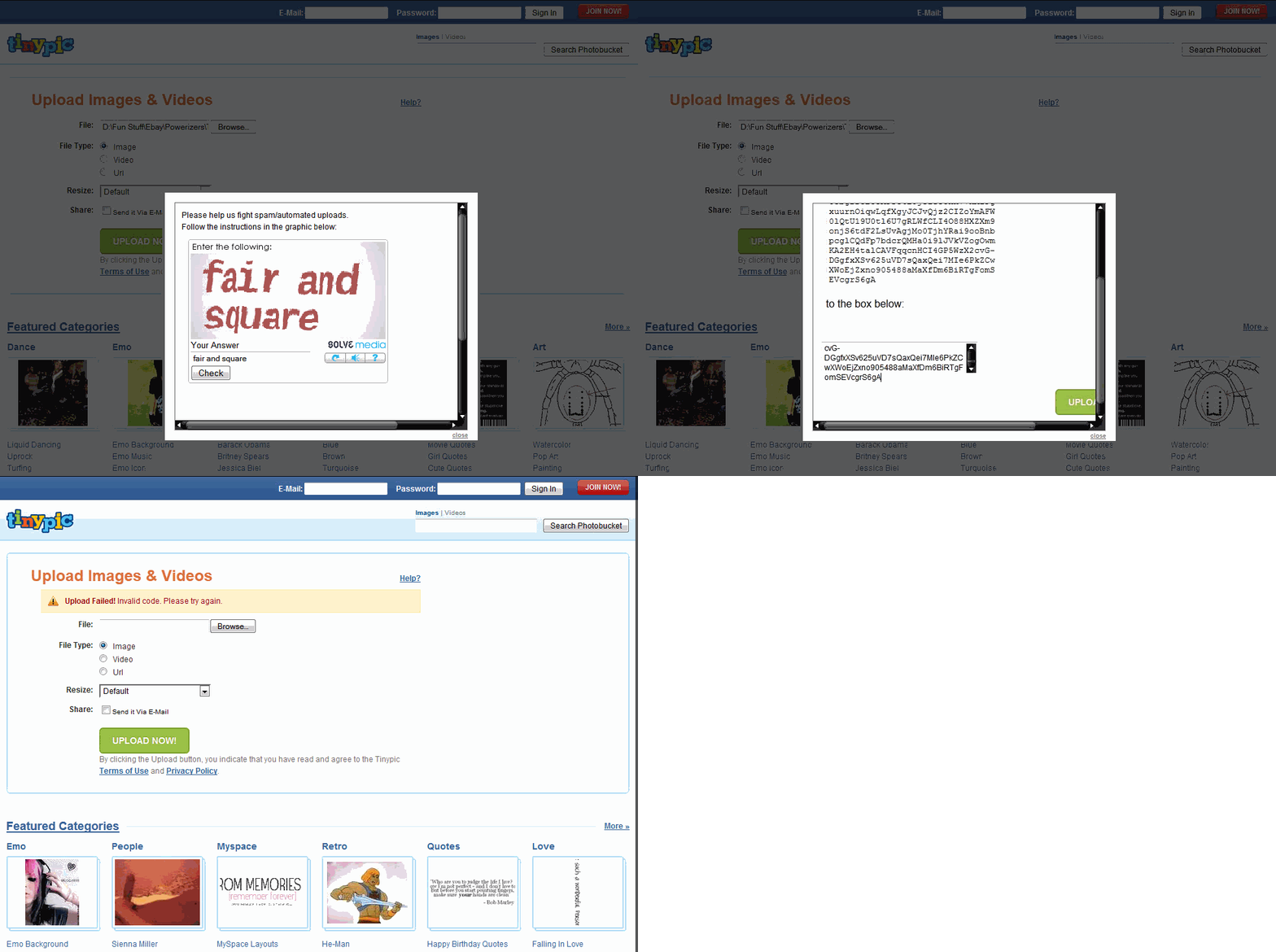
www.tinypic.com. No matter how many times I respond to their Captcha request correctly when uploading a photo I always get a "Captcha reply failed" message. I have not tried disabling NoScript and restarting Firefox. My solution so far has been to use Internet Explorer for that site.
Re: Problems with Captcha
Posted: Mon Jul 02, 2012 12:59 pm
by therube
Sometimes I get a captcha at
www.tinypic.com (even though I have already logged in to my account), though it has always worked fine for me?
Screenshot of this "Captcha reply failed" message?
(Perhaps you could post it at tinypic
.)
As a test, create a new, clean Profile, install NoScript, leave it at its defaults, & see if tinypic captcha works as expected.
Re: Problems with Captcha
Posted: Mon Jul 02, 2012 3:36 pm
by 7leagues
I'm unable to access my second profile because the claimed Tools > Switch Profile option does not exist and I made the error of checking the box in the Profile Manager that said "Do not ask me anymore".
Here's the Captcha screenshots as an animated GIF so you can verify the correct code was entered before getting the failed message:
Re: Problems with Captcha
Posted: Mon Jul 02, 2012 5:30 pm
by dhouwn
7leagues wrote:I'm unable to access my second profile because the claimed Tools > Switch Profile option does not exist and I made the error of checking the box in the Profile Manager that said "Do not ask me anymore"
See:
http://forums.informaction.com/viewtopi ... 040#p40040
Re: Problems with Captcha
Posted: Mon Jul 02, 2012 5:57 pm
by 7leagues
Re: Problems with Captcha
Posted: Tue Jul 03, 2012 6:07 am
by dhouwn
Heh, didn't notice you being the same person.

Re: Problems with Captcha
Posted: Tue Jul 03, 2012 7:58 am
by 7leagues
Although I am the same person I regret I did not provide the answer to the question you asked. Sorry about that.

Having achieved entry into my new profile I tested the Captcha at tinypic.com and still got the same result. Could it be NoScript interfering with the data transfer of the Captcha form? Are you able to upload anything without logging into an account dhouwn? Actually, believing that the lack of account may have been the issue, I created one but still got the same upload failed message.
Re: Problems with Captcha
Posted: Tue Jul 03, 2012 11:09 am
by therube
Ah, you're right, NoScript is interfering (& perhaps more so when you are not logged in).
In addition to tinypic.com, you also need to allow solvemedia.com or else you always returned a failure.
Now solvemedia.com does not show up to be allowed until the captcha box actually displays, so it is more apt to be overlooked.
(There is also a saymedia.com that may be needed if you wanted the captcha to "speak" the code to you.)
Re: Problems with Captcha
Posted: Tue Jul 03, 2012 1:28 pm
by 7leagues
I feel really stupid. The Captcha form has Solvemedia on it so how could I have overlooked that?!?!
Thanks so much for getting to the bottom of that therube.