Page 1 of 2
[DONE] Keep "Globally Allowed" Icon along with Blocked Objs
Posted: Thu Sep 13, 2012 6:09 pm
by therube
I have Allow Global set, but the Icon is not Showing it Always?
Waste Management is not show Allow Global, yet it should be?
Yet SeaMonkey & BoA are?

Re: Allow Global but Icon not Show it Always?
Posted: Thu Sep 13, 2012 6:34 pm
by therube
And if I start the other way around, Not Allowed Global & with all Temporary Allow's Revoked:
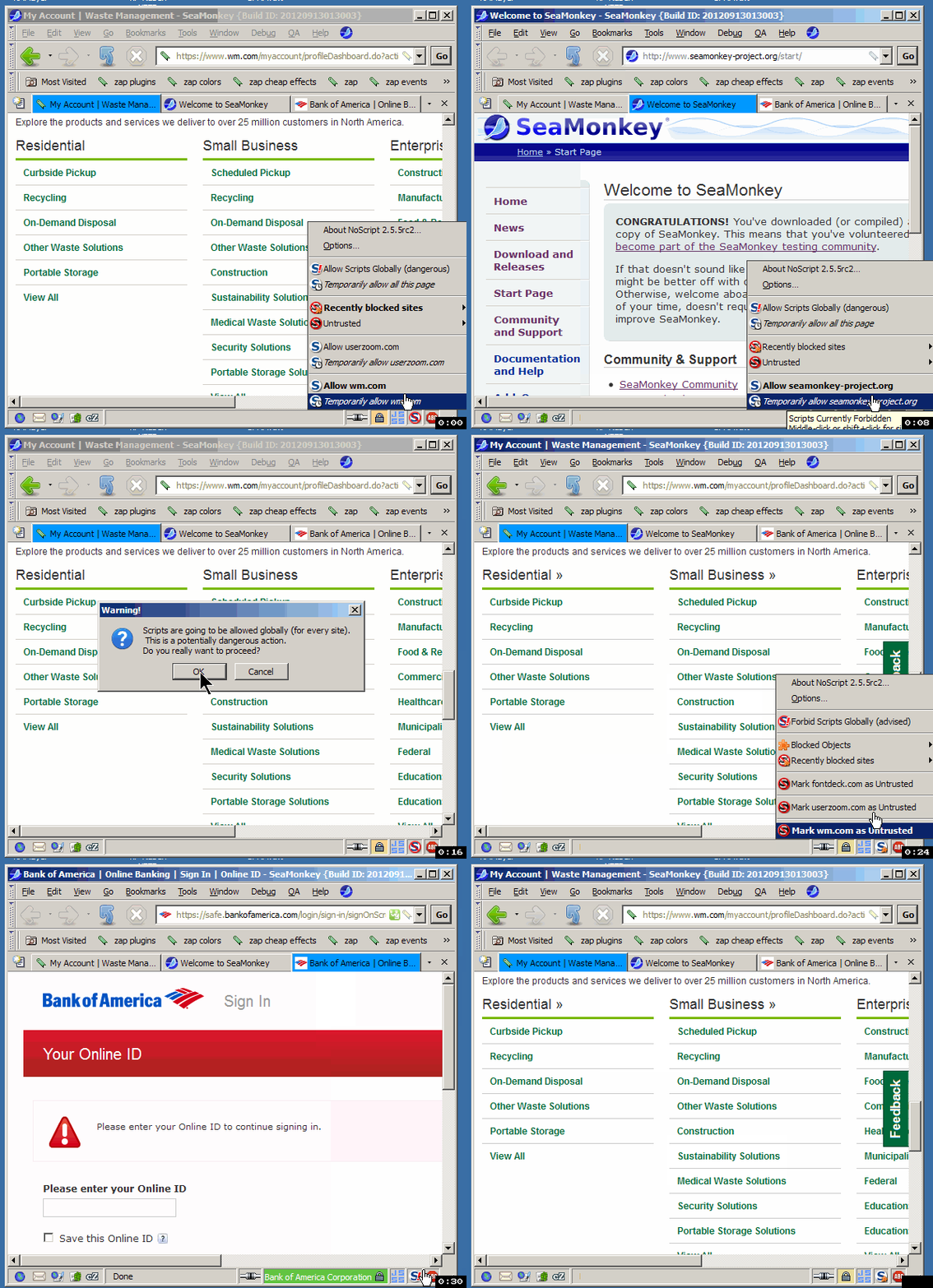
Re: Allow Global but Icon not Show it Always?
Posted: Fri Sep 14, 2012 11:31 pm
by Tom T.
therube wrote:I have Allow Global set, but the Icon is not Showing it Always?
The fact that "Forbid Scripts Globally (advised)" shows in the OP is your proof that scripts are Globally Allowed.
Just as seeing "Forbid informaction.com" means that you have allowed or whitelisted it. Seeing "Allow xyz.com" means that it is default-denied.
It is the same with Global.
Isn't there an exclamation point on the NS icon, obscured by the "hand" cursor? There is one for me when I click Globally Allow.
Re: Allow Global but Icon not Show it Always?
Posted: Tue Sep 18, 2012 3:39 pm
by therube
The fact that "Forbid Scripts Globally (advised)" shows in the OP is your proof that scripts are Globally Allowed.
It may
say that, but unless you look, you do not see that.
Where I would expect the icon to
show that, but it does not.
And it seems it is like that if there are
Objects not allowed, even if scripts
are Globally Allowed.
A bit confusing IMO.
Re: Allow Global but Icon not Show it Always?
Posted: Tue Sep 18, 2012 11:02 pm
by Thrawn
@therube: Have you enabled 'Apply these restrictions to whitelisted sites too' on the Embeddings tab?
If so, then it makes sense that you're blocking objects, and IMHO, the Blocked Objects icon makes more sense than the Globally Allowed icon in this context. After all, you're not really in globally-allow mode, you're in click-to-play mode.
Re: Allow Global but Icon not Show it Always?
Posted: Thu Sep 20, 2012 2:53 pm
by therube
> Have you enabled 'Apply these restrictions to whitelisted sites too'
Yes I do.
And that does seem to be the reason I am seeing what I am.
Only that I find it confusing, unexpected.
Somewhere along the line, I've Allowed Globally.
Because I happen to come to a site where an object is blocked, the icon changes, no longer indicating I've Allowed Globally.
I get tied up on that site, forgetting that I've Allowed Globally, the icon does not give (me) a clue.
Finally finish up on that site & I'm out & about elsewhere, & then it dawns on me, whoa! I've still got Allow Globally enabled :surprise!:
Re: Allow Global but Icon not Show it Always?
Posted: Thu Sep 20, 2012 10:10 pm
by Thrawn
So...what you'd like to see is an icon with the exclamation mark *and* the cog? And here was me thinking that there are
already a lot of icons...but yes, that would be more descriptive. Up to Giorgio to sort out.
If he doesn't want icon proliferation, though, and you have to have just one of the two, I still think that the cog makes more sense in this context than the exclamation mark. Forgetting that you've allowed globally won't break things, whereas forgetting that you've blocked objects will.
Re: Allow Global but Icon not Show it Always?
Posted: Fri Sep 21, 2012 5:46 am
by GlobalAllower
Thrawn wrote: Forgetting that you've allowed globally won't break things, whereas forgetting that you've blocked objects will.
However allowing globally when you navigate to an untrusted site is a security risk, while blocked objects may be a temporary inconvenience at worst. More logially, icons should favour the security side rather than convenience if the central function of NS is security, wouldn't a person say? Isn't this unexpected failure to signal relaxation of security what surprised the OP?
Re: Allow Global but Icon not Show it Always?
Posted: Fri Sep 21, 2012 6:35 am
by Tom T.
GlobalAllower wrote:Thrawn wrote: Forgetting that you've allowed globally won't break things, whereas forgetting that you've blocked objects will.
However allowing globally when you navigate to an untrusted site is a security risk, while blocked objects may be a temporary inconvenience at worst. More logially, icons should favour the security side rather than convenience if the central function of NS is security, wouldn't a person say? Isn't this unexpected failure to signal relaxation of security what surprised the OP?
Agree with Global Allower.
Re: Allow Global but Icon not Show it Always?
Posted: Fri Sep 21, 2012 7:58 am
by Thrawn
OK; doesn't affect me much. But surely, by choosing to globally allow, which is marked 'Dangerous', you take that risk upon yourself?
Re: Allow Global but Icon not Show it Always?
Posted: Fri Sep 21, 2012 8:15 am
by Tom T.
Thrawn wrote:OK; doesn't affect me much. But surely, by choosing to globally allow, which is marked 'Dangerous', you take that risk upon yourself?
I think you''re misunderstanding G-A and me. Not saying that there should be two icons showing for Globally Allowed, but it seems that therube's OP complaint was that even the exclamation point does not always show. It should, as a reminder, and *especially* if GA is turned on accidentally, as happened
here.
And yes, he's right -- just confirmed. With scripts globally allowed, a blocked object will in fact cause the "blocked objects" icon to
replace the exclamation point. I think both need to be there -- keeping in mind accidental GAs, too. The exclamation point could be moved to the middle or left side of the NS icon, so that with the BO icon in the lower right, both show prominently.
@
therube: Care to submit an RFE for that?
Re: Allow Global but Icon not Show it Always?
Posted: Fri Sep 21, 2012 2:35 pm
by therube
> you'd like to see is an icon with the exclamation mark *and* the cog?
Not necessarily.
The exclamation mark is what I would be looking for & expecting.
And here is why:
> However allowing globally when you navigate to an untrusted site is a security risk,
> while blocked objects may be a temporary inconvenience at worst.
> choosing to globally allow, which is marked 'Dangerous', you take that risk upon yourself?
True.
And that is why, when my memory lapses, something needs to be thrown into my face to remind me what I've done. Seeing the exclamation point does that.
> Care to submit an RFE for that?
Well if things are currently working as designed, then that is just what this thread has always been about

.
Re: Allow Global but Icon not Show it Always?
Posted: Sat Sep 22, 2012 9:26 am
by Tom T.
therube wrote:Tom T. wrote:Care to submit an RFE for that?
Well if things are currently working as designed, then that is just what this thread has always been about
.
Giorgio may not have the time to follow every single thread (that's why you and I and Alan and
GµårÐïåñ are here
), so I edited the title to RFE. If that does not catch his attention in a couple of days, I can PM him.
Re: [RFE] Keep "Globally Allowed" Icon along with Blocked Ob
Posted: Sat Sep 22, 2012 7:42 pm
by Giorgio Maone
OK, understood, agreed and put in my TODO list, thanks.
Re: [TODO] Keep "Globally Allowed" Icon along with Blocked O
Posted: Sun Sep 23, 2012 5:43 am
by Tom T.
Looks like it was done in
2.5.6rc1.
I had edited the title from RFE to TODO -- will change again, to DONE.
Thanks, Giorgio.